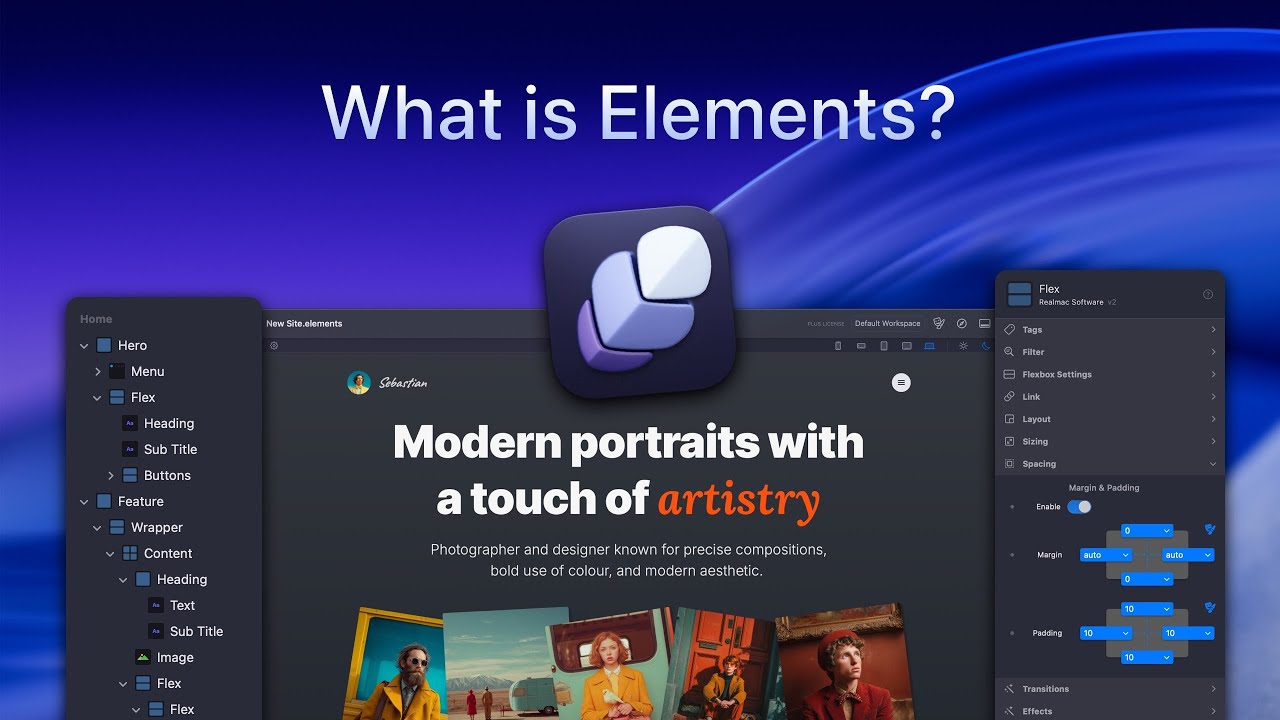
Drag-and-drop, no code. Designed and made by Realmac Software, the same folks who’ve been making Mac apps for over 20 years.
Save 30% on RapidWeaver Elements
Discount applied automatically, or paste the code on the order page.
Renews annually. You can Cancel anytime, but keep using the App!
The press has praised Elements for its power and simplicity.
"Capable and versatile visual website editor that creates pro quality websites without writing code."
"If you're looking for a full suite of visual development tools, Elements should really be at the top of your list."
Most tools make web design slow and complicated. Elements keeps it fast, flexible, and visual, giving you complete control.

Kickstart your project with beautifully designed templates. Fully responsive, easy to customize, and ready to drop straight into your new website.
Use the Node Browser to see your entire page structure at a glance. Jump between elements, make quick edits, and keep your layout perfectly organised.
Elements has helped thousands of creators build beautiful websites
The next big thing!
In my opinion, Elements is more than just the next step forward for web development. It’s the next big thing!

100 times better than Webflow
RapidWeaver Elements is already 100 times better than Webflow. Much better performance, nicer architecture (Tailwind, Alpine, Twig, etc.), and easier to customise and extend.

Only wish I’d bought earlier
Elements looks really cool. Visual Site builder, completely offline with 1 Year of updates. Only wish I'd paid attention and bought earlier.

Tremendous power
The continuous updates give Elements tremendous power in website design. I am very happy to be able to turn my ideas into reality thanks to Elements.

Excellent features
Elements has shaped up wonderfully, great polish & excellent features. Stellar job, guys.

Elements is perfect!
I have been enjoying using it so much! The best part is Elements has something for everyone, ease of use and deep diving development!

We’ve answered some of the most common questions about Elements below.
Renews annually. You can cancel anytime, but keep using the App!