How to add Google Analytics to a website

Dan Counsell · Founder of Realmac SoftwareUpdated
We’ve made RapidWeaver, a website builder for Mac, since 2004. Each guide works with any tool, then shows how in RapidWeaver Elements.
Analytics tells you how many people visit, where they come from and which pages they read. Google Analytics is free and the most widely used.
How to add Google Analytics to a website
- Sign in at analytics.google.com with a Google account.
- Create a property for your site, with your time zone and currency.
- Add a web data stream. Enter your site’s address and a name.
- Copy the Google tag. Under the stream, open View tag instructions and choose to install it manually. It looks like this, with your own ID:
<script async src="https://www.googletagmanager.com/gtag/js?id=G-XXXXXXXXXX"></script>
<script>
  window.dataLayer = window.dataLayer || [];
  function gtag(){dataLayer.push(arguments);}
  gtag('js', new Date());
  gtag('config', 'G-XXXXXXXXXX');
</script>
- Paste it into the
<head>of every page, ideally through your builder’s site-wide code setting. - Publish, then open Reports > Realtime in Analytics and visit your site. You should see yourself within a minute.
Cookie consent
Google Analytics sets cookies. In the UK, the EU and some other places, you usually need visitors’ consent before it loads, which means a consent banner. Check the rules where you and your visitors are. This isn’t legal advice.
Private alternatives
If you only want to know visits, top pages and where people come from, privacy-first tools are simpler:
- Fathom and Plausible don’t use cookies and usually don’t need a consent banner. Both are paid.
- Ahrefs Web Analytics has a free tier.
They’re also easier to read than Google Analytics, which has a lot of reports most small sites never need.
Add analytics in RapidWeaver Elements
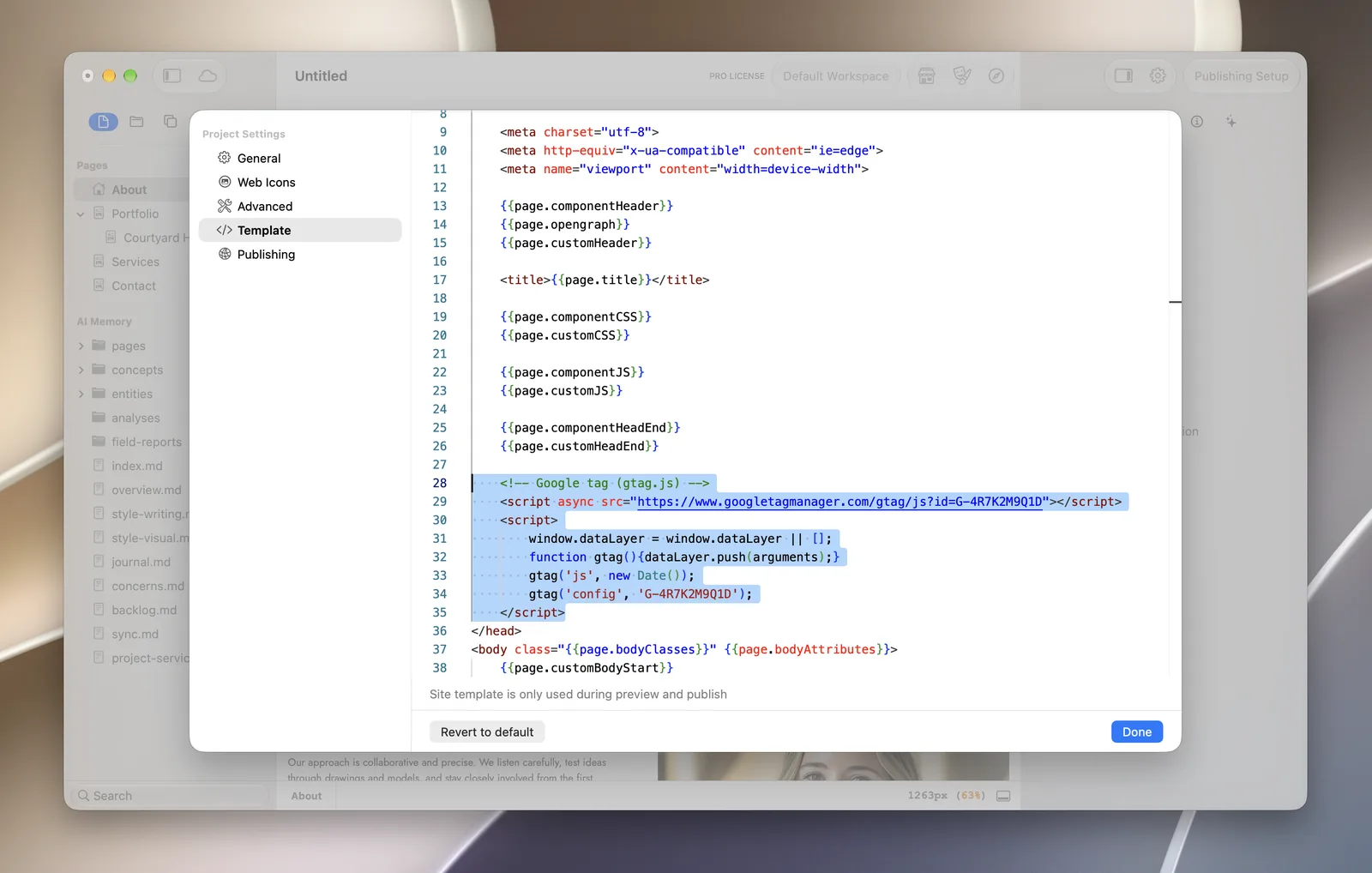
In RapidWeaver Elements, paste the tag once and it goes on every page:
- Click the gear icon to open Project Settings, then choose Template.
- Paste the code just above the closing
</head>tag, then click Done. - Publish.
To add code to one page only, select the page, click Edit Extra Code in the Page Inspector, choose Head Start and paste it there. Our manual recommends Fathom as a simpler option.
Questions about Google Analytics
Is Google Analytics free?
Yes, for almost every website. There’s a paid version for very large companies.
Why is Google Analytics showing no data?
Check the tag is on the live site (view the page source and search for your G- ID), that you published after adding it, and that an ad blocker isn’t blocking it in your own browser. New properties can take a day to fill the standard reports; Realtime is instant.
Do I need Google Tag Manager?
Not for analytics on a small site. Tag Manager helps when you manage many tracking tags. For one analytics tag, paste the Google tag directly.
