How to get your website on Google

Dan Counsell · Founder of Realmac SoftwareUpdated
We’ve made RapidWeaver, a website builder for Mac, since 2004. Each guide works with any tool, then shows how in RapidWeaver Elements.
Google finds most sites on its own in the end, but you can make it quicker and make sure nothing’s in the way.
Check whether Google has found your site
Search for site:yourdomain.com. If pages come up, Google has them. If nothing comes up, it hasn’t found you yet, or something is stopping it.
How to get your website on Google
- Open Google Search Console at search.google.com/search-console and sign in with a Google account.
- Add your site. The Domain option covers every version of your address, but needs a DNS record at your domain provider. The URL prefix option is simpler: you can verify it with a meta tag or a file on your site.
- Verify ownership with the method you chose.
- Submit your sitemap. Open Sitemaps, enter
sitemap.xmland click Submit. - Ask Google to index your home page. Paste its address into the search box at the top and click Request indexing.
Do the same in Bing Webmaster Tools. It also feeds other search engines and some AI tools.
What stops a page showing up
- A
noindextag in the page’s head. - robots.txt blocking the page or the whole site.
- A password on the site or page.
- Duplicate pages, where Google picks another version.
- Very thin pages with almost no text.
Search Console’s Pages report tells you which pages aren’t indexed and why.
Helping your pages rank
Being indexed means Google knows your page. Ranking means it shows it for searches.
- Answer a real question that people search for, better than the pages already ranking.
- Use the words people search in your page title, first heading and first paragraph.
- Write a clear title and description for every page. They’re what people see in results.
- Make it fast and work on phones. See make a website mobile friendly.
- Earn links from other sites: local directories, partners, suppliers, press.
- For a local business, set up a Google Business Profile. It’s free and often matters more than your site for local searches.
SEO settings in RapidWeaver Elements
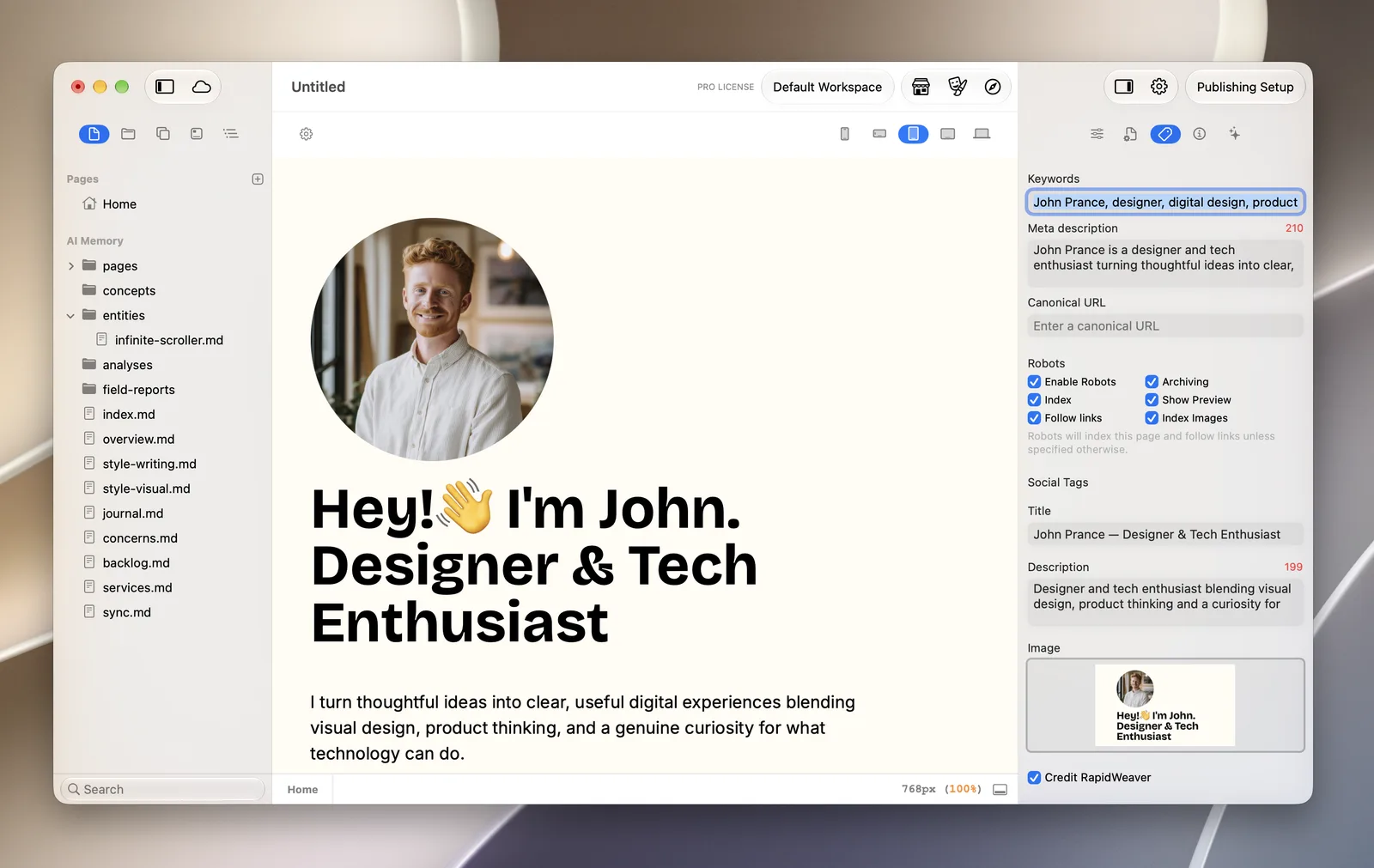
RapidWeaver Elements has the basics built in:
- A metadata panel in the Page Inspector for the description, canonical URL, robots settings, and the title, description and image used when the page is shared.
- A
sitemap.xmlwritten on every publish, with an Include in sitemap option for each page. - Heading levels you choose on each Heading component, and alt text for each image in its Resource Info.
- A
robots.txtyou add from the page list with New File. - An option to publish an AI-friendly Markdown copy of every page, in Project Settings > Advanced.
Questions about getting on Google
How long does it take for a new website to show up on Google?
Often a few days to a couple of weeks for the first pages. Ranking well for competitive searches takes months.
Do I have to pay to be on Google?
No. Being listed in normal results is free. You only pay for ads, which are separate.
Why does Google show a different title for my page?
Google sometimes rewrites titles that are too long, too vague or don’t match the page. A short, accurate title is more likely to be used as it is.
