How to build a website with AI

Dan Counsell · Founder of Realmac SoftwareUpdated
We’ve made RapidWeaver, a website builder for Mac, since 2004. Each guide works with any tool, then shows how in RapidWeaver Elements.
Yes, AI can build a website. A good prompt gets you a reasonable first draft in minutes. The hard part comes after: changing the details, keeping the site working, and owning what you’ve made. How that goes depends on which kind of AI tool you use.
Three ways to build a website with AI
| AI site generator | Vibe coding | Your AI tool in a website builder | |
|---|---|---|---|
| Examples | Wix, Squarespace, Hostinger | ChatGPT, Claude, Cursor writing code | ChatGPT or Claude connected to RapidWeaver Elements |
| You start with | A prompt and a few questions | A prompt | A prompt, or a template |
| You edit by | The platform’s editor | Asking the AI again, or editing code | Asking the AI, or clicking and typing on the page |
| Where the site lives | On the platform | Wherever you put the code | On your Mac, published to any host |
| Good for | A quick, standard site | Developers, prototypes | A site you want to keep changing yourself |
AI site generators
You answer a few questions or write a prompt, and the platform builds a site with pages, images and text. It’s quick, and fine for a standard brochure site. The catch is that the site lives on that platform: you pay its monthly fee for as long as you want the site online, and you can’t take the design elsewhere.
Vibe coding
You ask a chatbot or a coding tool to write the HTML and CSS for you. You get real code that you own. The catch is everything else: you need to host it, fix it when something breaks, and change it later, often by asking the AI again and hoping it doesn’t undo something else. It suits people who can read code. See vibe coding a website.
Your AI tool in a website builder
Here the AI works inside a real website builder. It adds pages and components in your project, and you see every change on the page as it happens. When the AI gets a detail wrong, you click on it and fix it yourself, no prompt needed. You keep the AI tool you already pay for, and the site is yours to publish anywhere.
Build a website with AI in RapidWeaver Elements
RapidWeaver Elements gives you two ways to work with AI, on every plan.
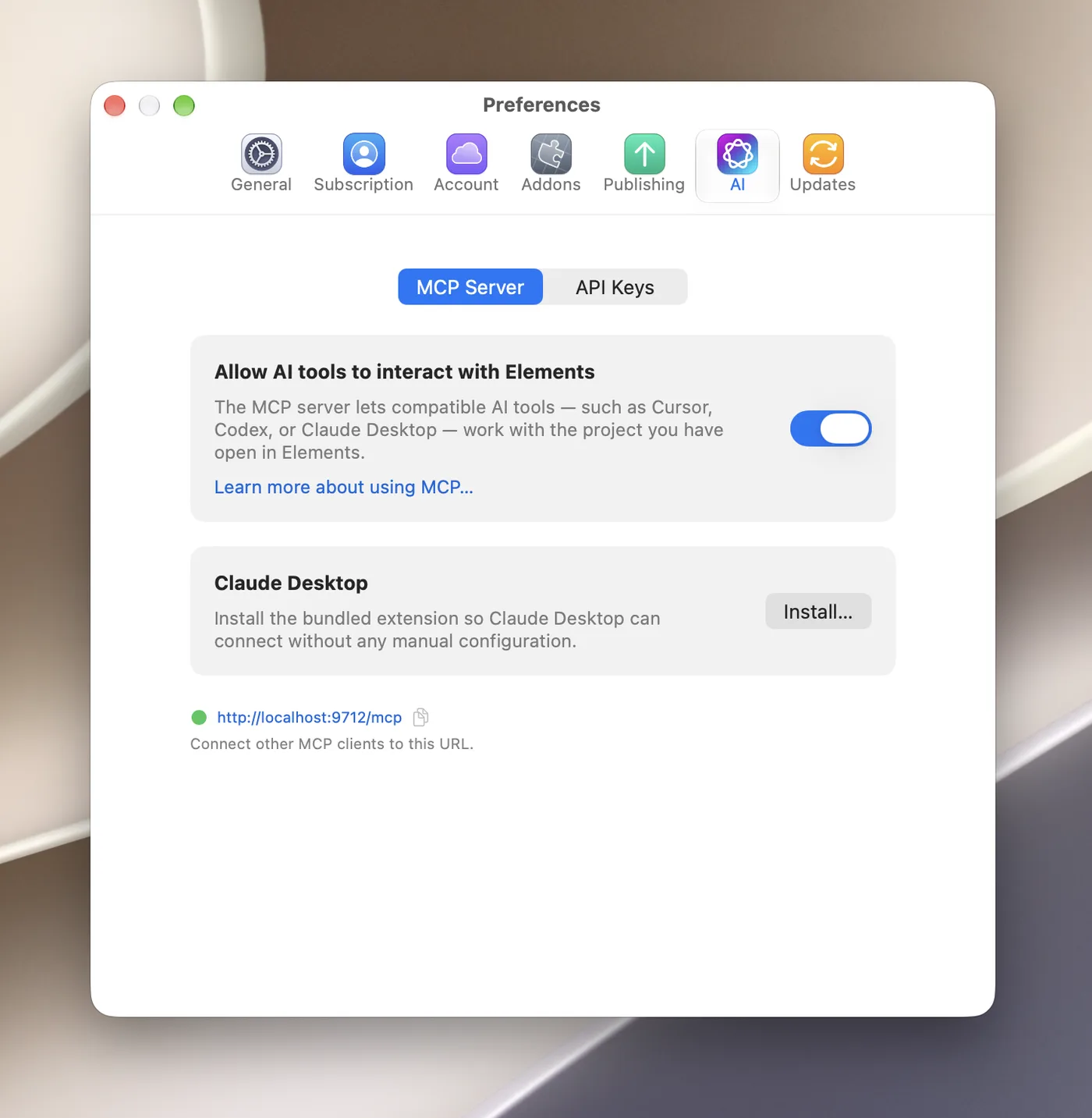
- The Elements MCP Server connects your own AI tool to the project you have open. It works with Claude Desktop, ChatGPT (in Work mode), Cursor, Codex, LM Studio and other tools that support MCP. It can use the AI subscription you already pay for.
- The Elements AI Assistant is built into the app. You add your own OpenAI or Anthropic API key, and usage is billed by them. It’s the fastest option, and it can generate images.
To connect your AI tool:
- In Elements, open Preferences > AI > MCP Server.
- Turn on Allow AI tools to interact with Elements.
- For Claude Desktop, click Install… in the Claude Desktop section. For other tools, copy the connection URL into the tool’s MCP settings.
- Keep Elements open with your project, then ask your AI tool for what you want.
Prompts that work well:
Read the project, then build a Services page with three services, matching the style of the Home page.
Make the headings, spacing and buttons on the Home and About pages consistent with the theme.
Add a contact page with a form asking for name, email and message.
Elements also keeps AI Memory for each project: notes about the site’s purpose, tone of voice and design decisions, which the AI reads before it makes changes. Ask the AI to update it when you decide something.
What AI is good at, and what to check
AI is quick at first drafts, layouts, repetitive edits and tidying copy. Check its work on facts (prices, opening hours, claims about your business), on images (make sure you have the right to use them) and on accessibility (headings in order, alt text on images). And read every word before you publish: visitors can tell when nobody did.
Questions about building a website with AI
Can AI build a whole website for me?
It can build a good first draft of a simple site. You’ll still want to check the copy, swap in your own photos and fix details. That’s easiest when you can click on the page and change things yourself.
Is it free to build a website with AI?
Some AI site builders have free plans with their own branding and address. Using your own AI tool with RapidWeaver Elements uses the subscription you already have, and Elements starts at $99 with a year of updates. Hosting and a domain cost extra with any option.
Do I own a website that AI built?
With RapidWeaver Elements, yes: the project is on your Mac and you publish it wherever you like. With an online AI builder, you own your content, but the site runs only on that platform.
Which AI is best for building websites?
The one you already use and like. In Elements, Claude through MCP was the fastest connected client in our testing, and the built-in AI Assistant is faster still. ChatGPT works too, a little more slowly.
