How to make a blog website

Dan Counsell · Founder of Realmac SoftwareUpdated
We’ve made RapidWeaver, a website builder for Mac, since 2004. Each guide works with any tool, then shows how in RapidWeaver Elements.
A blog is a list of posts, newest first, with a page for each post. Every blogging tool does that. What differs is where your writing lives, and how easy it is to take it with you.
Pick where your posts will live
| Option | Where posts live | Good for |
|---|---|---|
| Online blog services | On the service’s servers | Starting today with no setup |
| WordPress | In a database on your host | Big sites with many writers and plug-ins |
| Markdown files | As plain text files you can open anywhere | Owning your writing and keeping the site fast |
Markdown is a simple way to write formatted text: # Heading, **bold**, - list item. A Markdown file opens in any text editor, now and in twenty years, which is why many writers prefer it.
Plan before you post
- Pick a subject you can write about every month. Consistency matters more than length.
- Write three posts before you launch. An empty blog looks abandoned.
- Decide on categories now. Three to five tags are easier to keep tidy than thirty.
Build a blog in RapidWeaver Elements
RapidWeaver Elements has a built-in CMS that keeps each post as a Markdown file, with details such as the title, date and tags in a short header at the top. There’s no database to look after.
- Open your project in RapidWeaver Elements and add a blog page and a post page.
- Add the CMS components: one to list your posts, one to show a single post.
- Write a post in the built-in Markdown editor, or in any editor you like, and save it in the posts folder.
- Set the page extension to .php on the pages that show posts. The CMS needs PHP 8.4 or newer on your host.
- Publish. New posts go up the next time you publish.
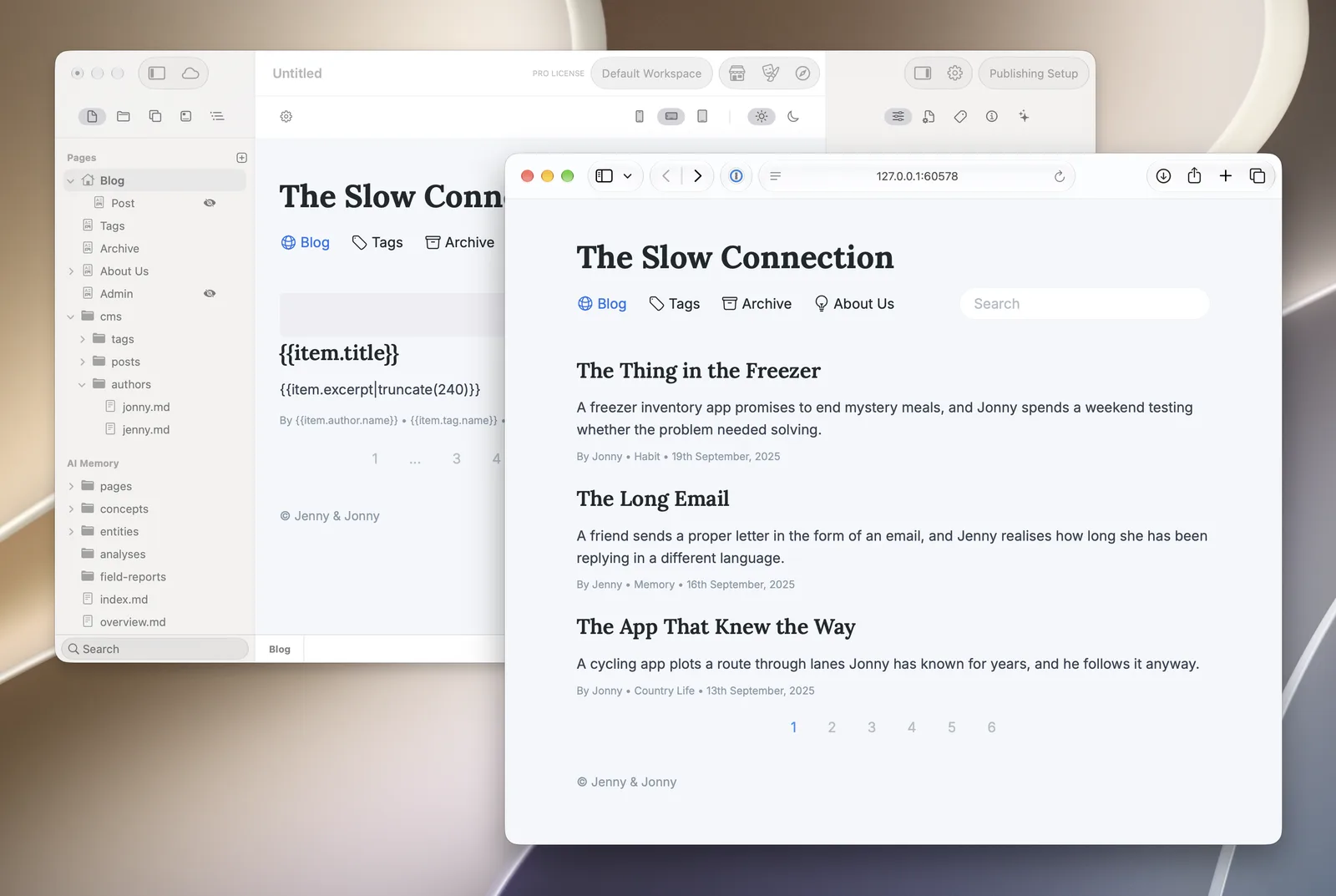
The CMS is included with every Elements licence, and so is the Online Editor, which lets you write and edit posts in a browser from anywhere. Elements CMS has the details, including what CMS Pro adds.
Help people find your posts
Give every post its own title and description, add alt text to images, and link related posts to each other. Elements adds each post to your sitemap so search engines can find it. Our guide to getting your website on Google covers the rest.
Questions about making a blog
Can I move my blog to a different host later?
Yes. Posts are plain Markdown files in your project, so you publish the same site to a new host and nothing is lost.
Do I need a database for a blog?
Not with a Markdown CMS like the one in Elements. Posts are files, so there’s nothing to back up separately and nothing to upgrade.
How often should I post?
As often as you can keep up for a year. Once a month, every month, is better than ten posts in January and none after.
